As part of being on The Schoolhouse Review Crew, I was able to use Logo Adventures from Motherboard Books with Jon.
I could tell from their site that it had to do with graphics, design and programing. From the image on their cover, I could picture Jon increasing his graphic design skills by learning to make better logos.
I downloaded the CD, MicroWorldsEX to our desktop computer. It seems like a small program and downloaded quickly without any thought from me. (That’s a good thing.) Then I started reading the spiral book. I don’t always share this, but I enjoyed the quality of this book. It is a paperback, the covers have a very soft plastic/thick cardstock feel. Delightful. The book is in black and white, 26 lessons, about a 120 pages long.
What I learned – is that it is written by Phyllis Wheeler for 8-12 year olds. I quickly saw that it is not exactly a Logo as in advertising symbol design course, but rather a computer course for Logo. Logo is a computer language created by MIT for children to teach problem solving. There are simple commands that allow for thinking and creativity.
The course is intended to be used once a week for a year. Since Jon just finished another programming course, and programs with Roblox, he went through the course quite a bit more quickly. She does say that she uses repetition for the 9-11 year olds to retain what they have learned, Jon was a one time through type of a student. She also has extra lessons for those a bit more advanced.
Jon quickly moved through lessons 1-13. The student learns the basic programming for the course. I do have to share – that I used this particular course for a different reason. Well, not too different since the reason MIT invented it was to give a fun way to teach kids to think.
We are working with Jon, our 12 year old, to be able to do more lessons on his own. We need to move fully into the realm of giving him tasks, assignments, written instructions, and then walking away. I am trying to get him to read the instructions, and then try at least a couple of times, before asking for help, to figure out what the goals are and how to perform the task. I am too quick to be an arms length away to verbally explain everything for him. This course came at just the right time to help us practice this!
I was glad that the lessons were quite simple to understand for him, it gave an excellent opportunity to practice.
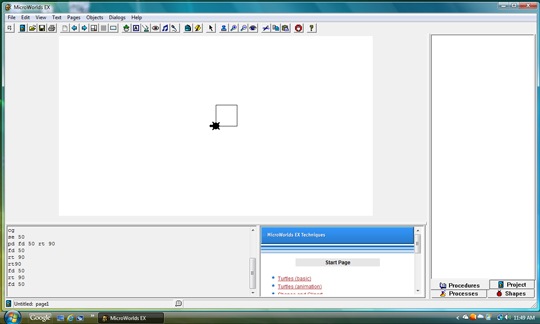 I found this image that he saved. You can see from the screen on the lower left hand side, his programming, and it takes all of those directions to have the computer draw a box. It was sort of funny, as Jon uses graphic software. He complained. He says – “I already know a much easier way to create a box.” He uses drag and drop. However, he did find that it was really precise and a bit challenging.
One thing that was cool, is that you’d have to read the text and figure out what it wanted. It would say something like, “First the turtle needs to turn left 0- degrees and put his pen down. Then he needs to go forward a ways, say 50 steps. Then what? Look at the answers in lesson 2 if you are stuck. Now make 30 e’s all over the page.” It doesn’t tell him exactly what code to use, it gives him a verbal challenge to create on the screen. Then it shows him a staircase and tells him a new challenge to add to it.
So even though the actual Logo programming was really simple – it was the daily discipline – a tool and a resource – to help his reading comprehension and give him an avenue to practice acting upon written words. IDEAL situation for how we like to learn.
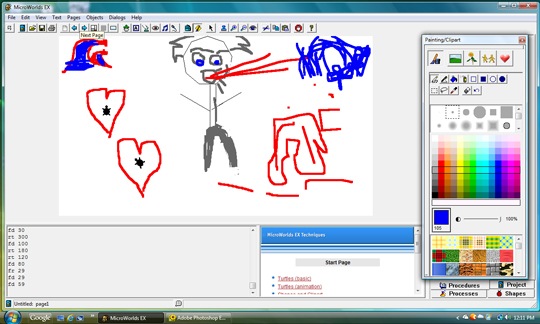
One of the things he liked was that he could program the ‘turtle’ to create shapes and designs, but then they encouraged the students to fill in the backgrounds with a paint tool found in the MicroWorlds EX software. I found the above image saved on my computer. I’m not quite sure, but I’m thinking there is a story behind this. . . . I see two red waves. A guy breathing a wave? and um? It’s Jon. Who Knows.

Here is his animation – He put a surfer on a wave and had him surf in a barrel. I tried to get it to record the animation, but couldn’t figure out how. During the animation, you only see one wave, it crests, the surfer drops in, rides for a bit, then it slows down, and he goes in the barrel, then comes out to the white water. Pretty cool. You can work on speeds and tell it when each new image appears. Really slick. Or as my surfing son would say – that’s sick! (rolls eyes)
We have about 7 more lessons to go with the program. My 14 year old son saw what his younger brother was up to and picked up the course as well. He hasn’t done as many lessons, but he does like to play with the MicroWorlds Ex. OH!
Speaking of EX. The only problem we had with the course, is that this book is for use with MicroWorlds 2.0 OR MicroWorlds EX software. We got super frustrated trying to figure out a lesson, and then realized, we needed to read a head, we had been reading for the 2.0, but the next paragraph was for EX. Other than that – smooth sailing.
I received the Logo Adventures Curriculum and answer key, plus MicroWorlds EX software valued at $129.99 in exchange for using as intended in our home for the review period and sharing our experience with you!


 +Angie Wright