
This morning I was hopping along on the Tuesday Hip Homeschool Hop when I hopped on to A Computer Mom’s Site. I found a past post about Categories in Google Reader – and clicked on over.
I have never spent any time in the Google Reader Settings. This morning, thanks to her encouragement, I DID!!! And I found TWO ways to solve the problems in my little Blog Subscribing Life. I’ve had such a fun time on line this morning, that I thought Maybe, just Maybe one of my readers would be as slow as me at all of this Google Reader Blog Follower Lingo and might want to hear what I learned. If you are cool and slick and know this stuff – – – -Why Didn’t You Tell Me??????? Oh. Sorry.
I have quite a few blogs in my Google Reader. Some people give the whole post to their RSS, some just a few lines. I find myself passing over those that I have to click in to get the whole post. Commenting gets hard, as I need to click into the post, and sometimes open another window. The joy of leisurely strolling from blog to blog is often lost – but I appreciate it when someone stops on my blog long enough to comment – even just a Hi – and I like to share the love. This morning I found out how to solve both of these problems!!!
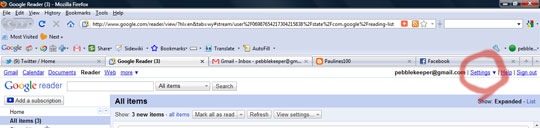
Go to the Settings up in the Top Right Hand of the Screen of your Google Reader, Click on Reader Settings.
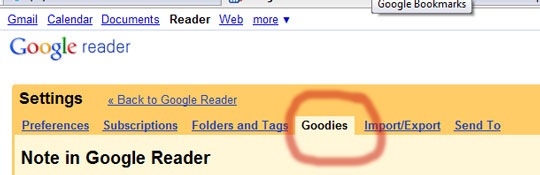
Click on Goodies
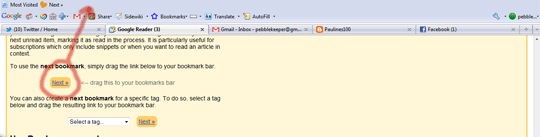
Scroll down to Use the Next Bookmark – and drag the Next box up to your bookmark bar.
( I had to turn on my bookmark bar in View, Toolbars)
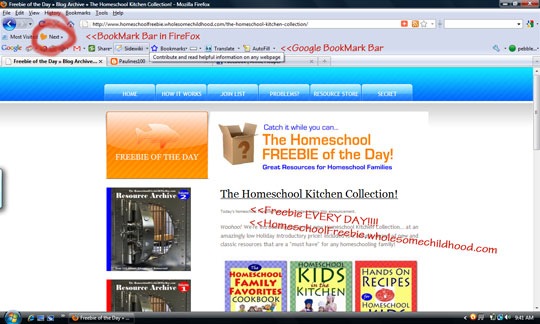
The Next Box will show up – and be connected to your reader items.
Whenever you want to take a moment to take in another bog post, click Next – and the whole website will pop up.
I feel like I’ve been talking to people from their gate using a walkie talkie, and have finally been invited to sit at the kitchen table!!
I have had so much fun reading my subscriptions, in full screen, seeing all of the faces, layouts, sponsors, and tips in the side bars!!! It has been a joy to leave comments here and there easily as well!!!! ( Can you tell I’m Excited????)
The other tip, is um, maybe, somewhat embarrassing. . . . . I want to help out friends with their Blogger Friend Connect, but I get overwhelmed with all of the stream to my Google Reader. I had to go through the Friend Connect and take a few blogs off the list that I love the blogger, but really didn’t identify with their audience. I JUST FOUND the setting in Google Reader that cuts the connection between the Reader and Google Friend Connect!!!!!
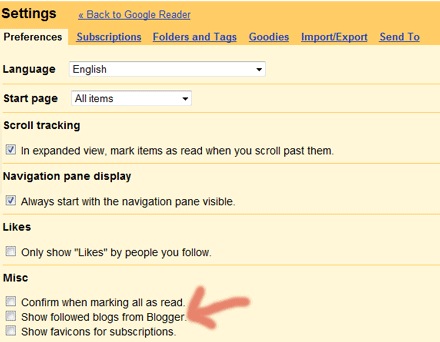
I prefer to read using the RSS feed – subscriptions, rather than the Google Friend Connect. Anyone Else??
Maybe its just my bitter root from WordPress.com not letting me have Google Friend Connect on my site. . . . . Maybe. 🙂 If I subscribe – and then Friend Connect – I get the feed twice. If I Friend Connect it puts all of those feeds in a separate folder, sometimes even if I categorize them into a folder. . . . . It has been the one remaining frustration with Reader. SOLVED!!!!
HO HO HO Merry Christmas!!!!!!
Thank You A Computer Mom for Encouraging me to Play in the Settings!!!!


 +Angie Wright




 Pebblekeeper
I’m really going to check into this!
Thanks for stopping by and telling me about the daily Advent readings at A Holy Experience. I’m going to check that out too!
Blessings! 🙂
Thank you wise friend!
I just figured out where my feed was! I had it set up a long time ago, but forgot where it was.
Thank you for always finding something new for me to discover!
We should plan a “virtual craft night/day” soon!
Missing you!
wow. I just might have to finally try the google reader now… thanks for the tip.
(hip homeschool hop)
When you click RSS , or the Orange Button , RSS feed, it will ask you what reader you want to read it in, just choose Google. 🙂
you’ve given me something to think about…i tend to be overwhelmed by google reader and i think it’s pretty ugly too, ha ha. found you at hip hop homeschool!
People spend so much time, stress, and monies on blog design, Google Reader strips all of that personality. 🙂